PLAY YOUR OWN SIDS ON THE JUKEBOX
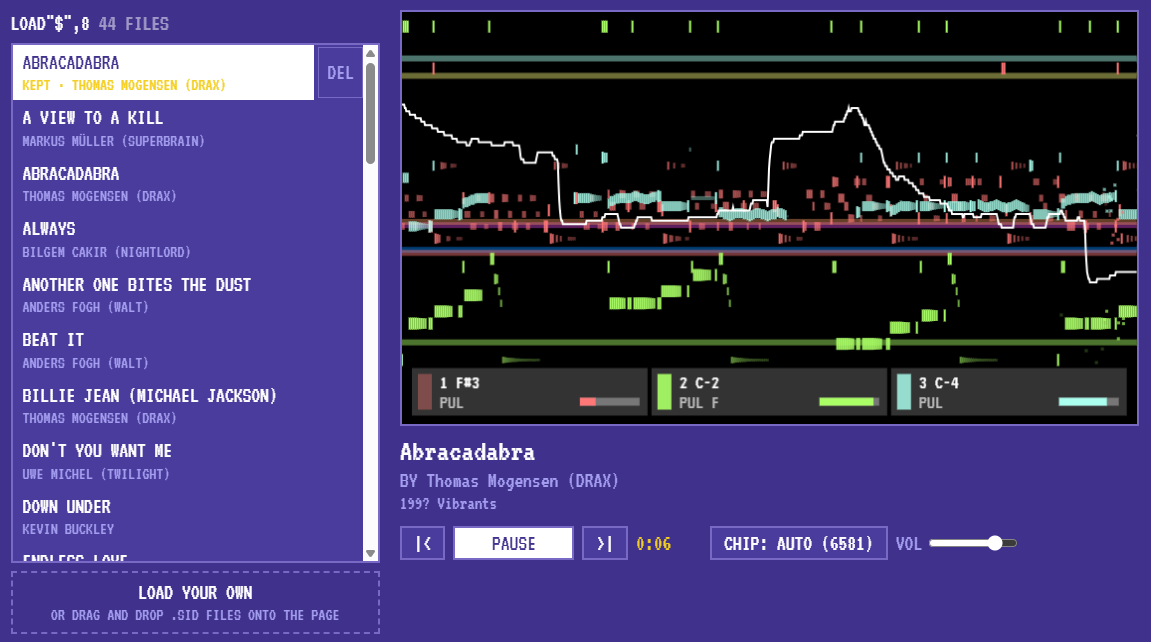
The jukebox has played our tunes since it opened. Now it plays yours.
Drag and drop
Got a folder of SID files? Drag one onto the jukebox page and let go. It goes on top of the list, marked YOURS, and starts playing. Drop a handful at once and they all join the list.
On a phone, or if you'd rather not drag, press LOAD YOUR OWN under the list and pick the files.
Everything the jukebox does for our tunes, it does for yours:
- The same cycle-exact emulation of the chip, libsidplayfp with reSIDfp.
- The three voices drawn on screen as they play: notes, waveforms, envelopes.
- Every subtune, with the + and - buttons.
- CHIP switches between the 6581 and the 8580, or leaves it to the tune.
It takes .sid files (PSID and RSID) and Compute!'s Sidplayer .mus files. The name, composer and year come from the file itself.
Your files stay with you
A file you drop plays right there in your browser. It isn't uploaded anywhere. Close the tab and it's gone.
Or keep them
If you'd like your tunes there next time, make an account. It's free and takes a minute. Logged in, every tune you add is kept in your account. Come back any day, from any computer, and they're at the top of the list, marked KEPT, ready to play.
Kept tunes are yours alone. Nobody else can see them, list them or play them. There's room for 500. To remove one, press DEL beside it, then SURE?.
Dropping a file you've already kept doesn't make a second copy. The jukebox finds the one you have.