COLOR BBS: OUR COMMODORE BOARD, REBUILT TO RUN ON A PC
The Comm-Adore BBS is getting a second line. And a third, and a fourth. For the last few days we've been building Color BBS, a re-creation of our board that runs straight on a PC. It looks and feels exactly like the board you know: the same welcome screens, the same menus, the same message base, the same fifty-three games. The difference is everything around it. Color BBS takes several callers at once, lets them see each other and chat, and gives the sysop a proper control panel.
It's in testing now, next to the board you can call today. When it's ready it takes over the same address, and if we've done our job, you won't notice anything changed until you see someone else on the board with you.
Why rebuild a board that works?
The Comm-Adore BBS runs Color 64 7.40, written by Greg Pfountz in 1985 and 1986, on a Commodore 64 with a SuperCPU, a CMD HD and a RAMLink, all emulated in VICE. It's real Commodore BBS software, and we love it. It's also a board built for 1986, which means:
- One caller at a time. When someone's on, everyone else gets a busy signal. That made sense with one phone line in a spare bedroom. On the internet it just means people get turned away.
- A whole emulated computer has to stay up around the clock: the 64, its accelerator, its drives, and our modem bridge between the internet and the 64's RS-232 port.
- Changes are hard. Every mod means editing BASIC on the 64, squeezing it into memory, and saving it back to an emulated hard drive with the board taken down.
We didn't want a different board. We wanted this board, without the single phone line. So instead of switching to modern BBS software, we used Color 64 itself as the blueprint and rebuilt it, screen by screen.
Exactly the same, on purpose
"Looks like Color 64" wasn't good enough. We wanted a caller on a real Commodore 64 with a WiFi modem to be unable to tell the difference.
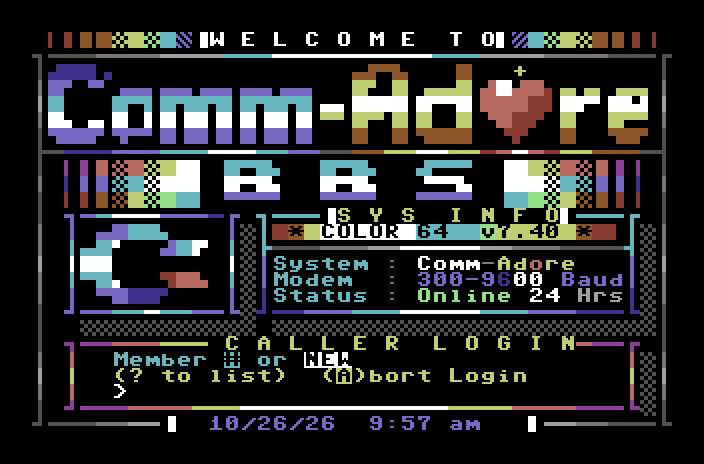
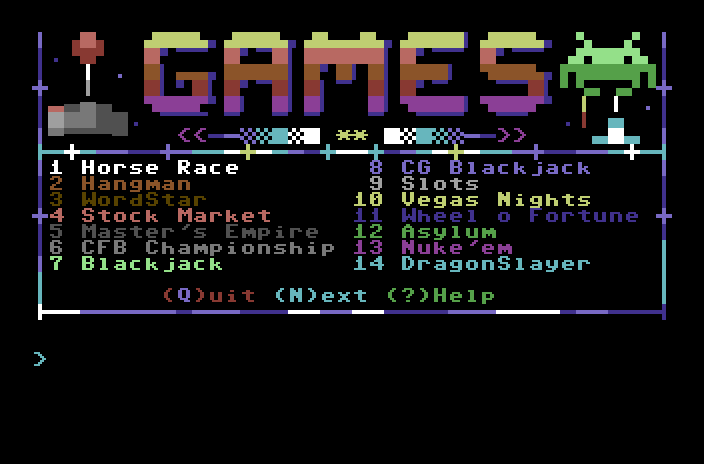
So every prompt on Color BBS is copied from the board's own BASIC program, and each one in our code says which line it came from. Every picture is sent byte for byte, the same color codes, cursor moves and all. Even the board's habits come along: the little animated cursor at COMMAND?, the rainbow text, the "Program loading...please wait..." when you move between the message and file sections. That message used to mean the 64 was loading the next part of the board from disk. Color BBS doesn't need to load anything, but it shows the message anyway, because that's how the board works.
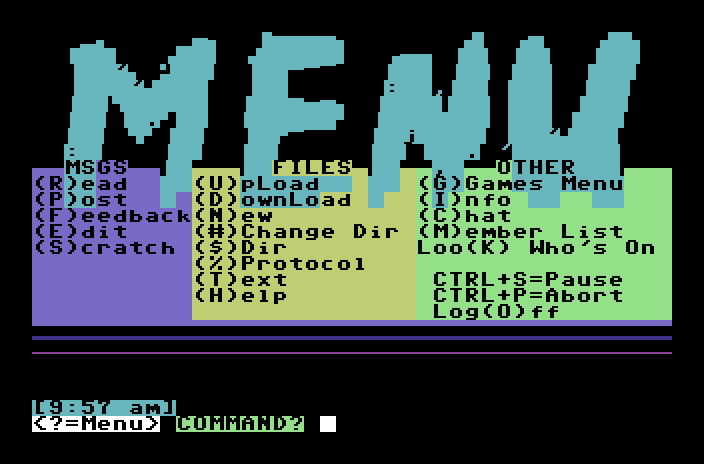
What's new for callers
We kept the changes small and only where having more than one caller made them worth it:
- Lots of lines. Color BBS takes several callers at once. You'll rarely hear a busy signal again.
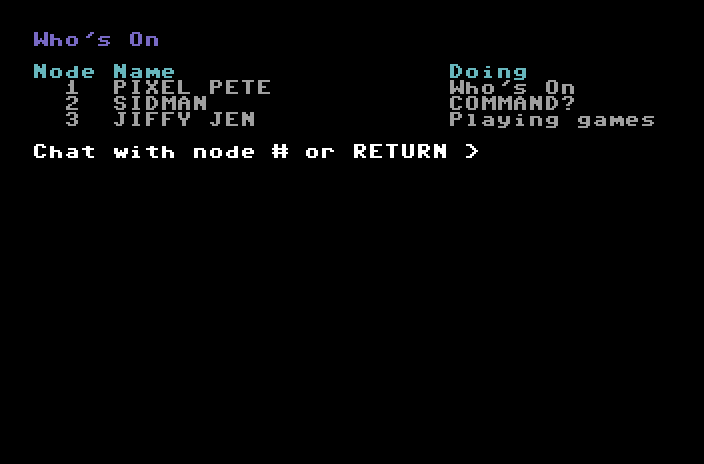
- Loo(K) who's on. Press K at COMMAND? to see who else is on the board and what they're up to: reading messages, playing a game, downloading. It's on every menu.
- Chat with each other. From the Who's On list, type someone's node number and they get a bell and a note at their next COMMAND?. They press K, say yes, and you're chatting: your typing in one color, theirs in another. Ctrl-P ends it, the same key that stops everything else on the board.
- No time limits. The board used to log you off when your daily minutes ran out. That was how a single-line board kept one caller from tying up the phone all night. With plenty of lines, we turned it off.
- New members see the news. On the old board, a brand-new member went straight to the main menu after signing up and didn't see the news page (with their own weather, which is why we ask for a zip code) until their second call. Now they see it right away.
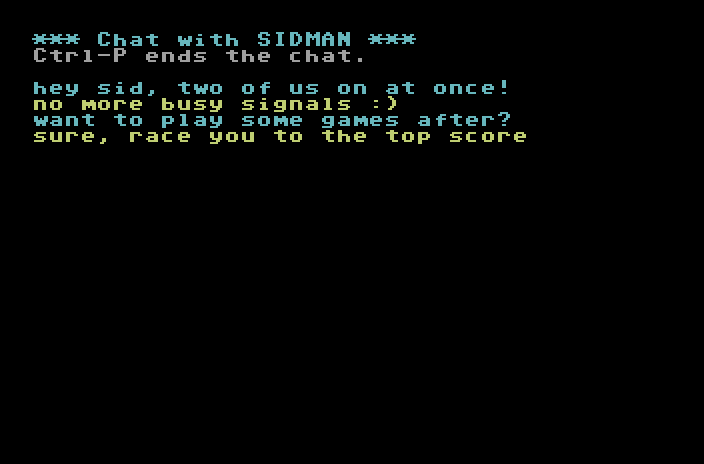
Everything else, from the message reader to the mailbox, file transfers and games, works the way it always has.
The sysop's side
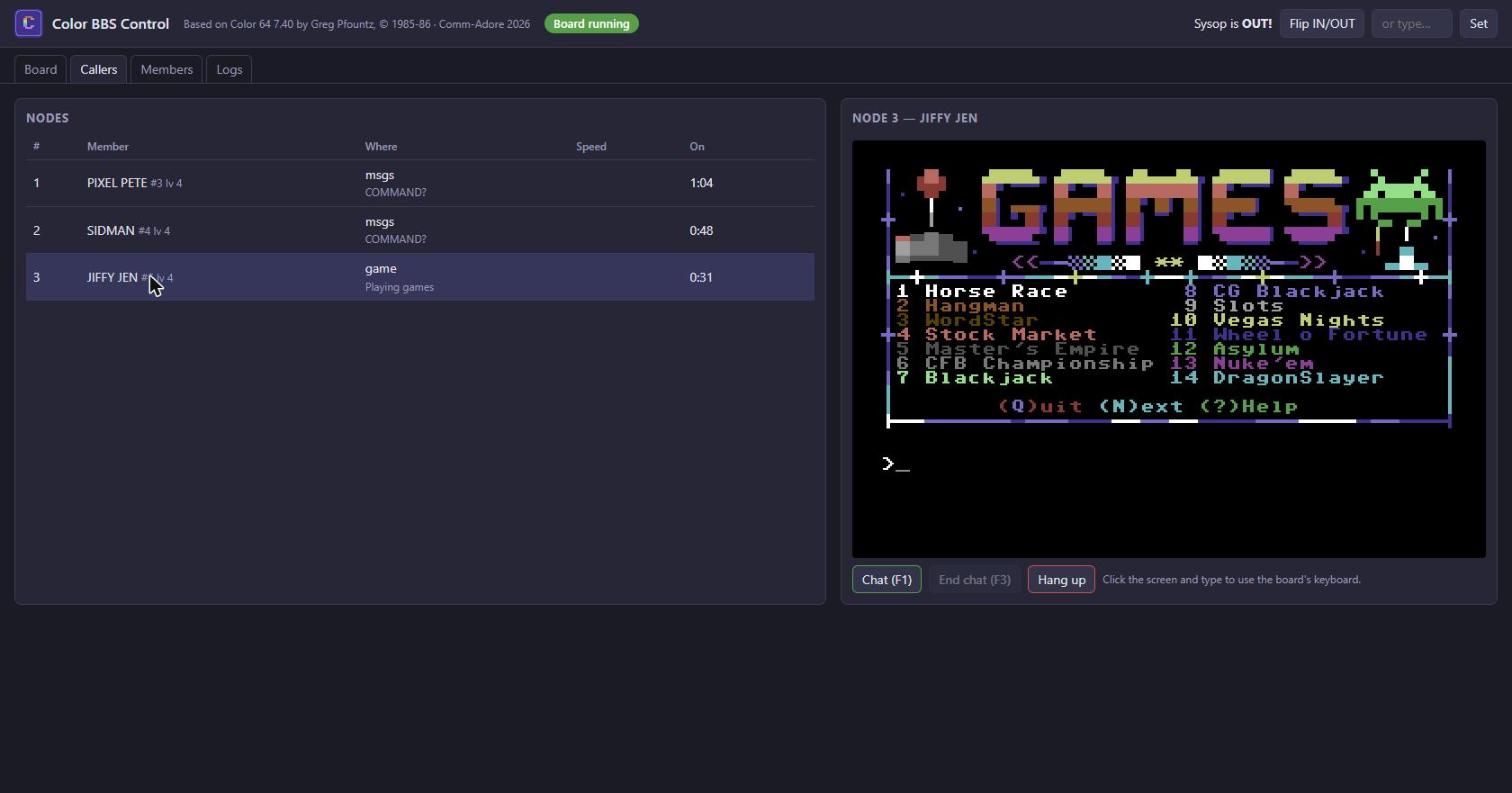
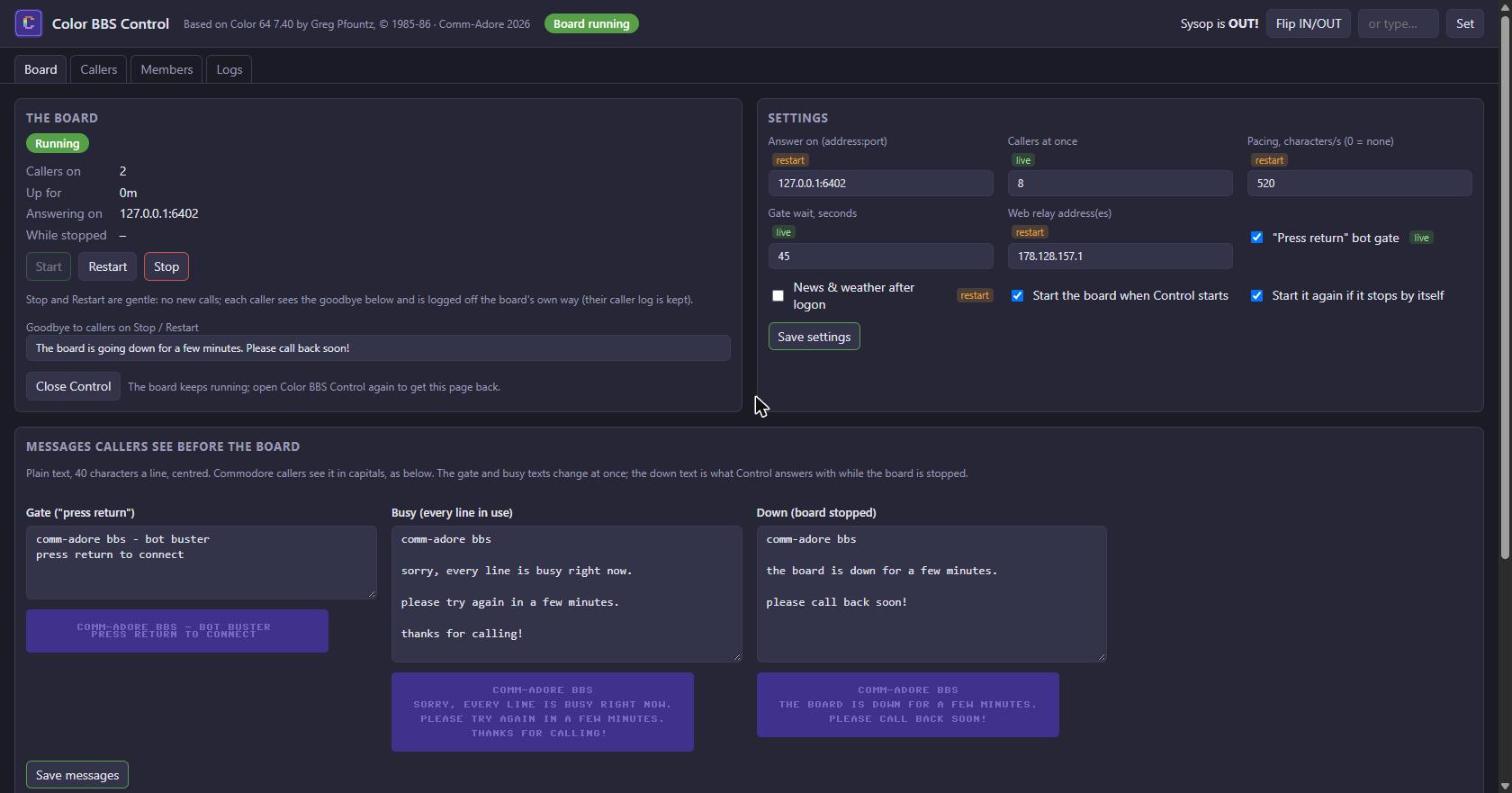
On a C64 board, the sysop sat at the 64 itself: they watched the caller's session on the monitor, pressed F1 to break in and chat, and ran a few special commands from the keyboard. With many callers at once, that needed rethinking. So Color BBS comes with Color BBS Control, a page that opens in the sysop's browser, on the same computer as the board:
- Callers: everyone who's on, where they are on the board, and any caller's screen, drawn live with the 64's characters and colors. One click starts a chat (it's the old F1 key), and the sysop can type for a caller or hang up a line.
- Board: start, stop and restart. Stopping is polite: nobody new gets in, everyone on sees a goodbye message and is logged off the normal way. If the board ever stops by itself, Control starts it again. While it's down, callers get a "back in a few minutes" message instead of silence.
- Settings and messages: how many callers at once, the "press return" bot check, the busy message and the others, each with a preview of how it will look on a Commodore screen.
- Members and logs: the member list with the board's own editing rules, the caller log, and the board's own log.
The sysop's commands from the original board still work from a caller's keyboard too: password maintenance, the caller log, validating a new member while answering their mail, and linking messages into a thread.
Under the hood (for the techy folks)
The blueprint. We started by taking the board apart: the BASIC programs that make up Color 64 (the login, the message system, the file section, the games and their overlays), turned back into readable listings, plus a 6502 disassembly of the machine-language routines the BASIC calls for the work that has to be fast: sending a character, reading a key, reading a line of input, listing the caller log. Color BBS is a Python program that follows those listings line by line. When the board does something odd, like the quickscan offering to start at the second message instead of the first (a variable left over from the command before it), we copied it and wrote down why.
One node per caller. The board runs on Python's asyncio. Each call gets its own node with its own copy of everything Color 64 kept in memory for its one caller: the screen state, the cursor, the colors, which overlay is "loaded", the caller log for that call. Only what callers really share is shared: the message index, the mail, the member list and the files, all in one SQLite database. Message numbers and mail are handed out inside one transaction, so two people posting at the same moment can't collide, and a new message shows up for everyone else right away.
The games run the board's own BASIC. Fifty-three games make up about 11,500 lines of Commodore BASIC. Rather than translate them by hand and get a thousand little things slightly wrong, we wrote a Commodore BASIC V2 interpreter in Python that runs the board's original tokenized programs. Around it is just enough of a C64 for them: the memory addresses the games PEEK and POKE, the SID chip's random numbers, the clock, the board's machine-language calls, and the disk drives, including the RAMLink the games keep their high scores on. Every game, message and quirk is the original. To test it, a fuzzer started every game on a scratch board and pounded it with random keys for two and a half minutes each. No crashes. (A few games have had a makeover since: one-screen Hangman, betting at the horse races, and the CFB National Championship with this season's real rankings.)
Golden sessions. How do you prove two boards are the same? We record one. A script calls the real board in VICE (log on, sign up, read messages, post, check mail) and saves every byte it sends. Then the same script calls Color BBS. Both byte streams go through a model of the 64's screen editor, and the two 40-by-25 screens, characters and colors, are compared after every step. The only differences allowed are things that should differ, like the time, the caller's data and the random welcome picture. The message reader matches the real board at every step, and the mail session matches byte for byte.
The 64's screen editor. A C64 BBS doesn't just print text; it leans on the 64's screen editor, and that has quirks. The best one: when printing runs off the end of a row, the 64 joins that row and the next into one 80-column "logical line", and a RETURN on a joined row skips its partner. Full-screen pictures fill every row, so after one, the rows are joined in pairs and the next text comes out double-spaced on a real 64. Color BBS keeps a model of each caller's screen, links included, so it knows exactly where the cursor is and places text the way the board does.
Pacing for real modems. A C64 drawing a PETSCII picture can only keep up with about 520 characters a second, whatever its modem's speed, and the WiFi modems many Commodore owners use (built on the ESP8266) can crash if they're fed one tiny packet per character. So Color BBS sends in chunks, paced to the caller. On telnet calls it goes further: after each chunk it sends a telnet "timing mark" that the modem answers once everything before it has gone out its serial port. That tells the board how fast your line really is, with nothing to set up. File transfers (Punter and Xmodem, the protocols Commodore terminals use) run at your line's full speed.
Tested. There are 164 automated tests that call the board the way a caller does: log on, read, post, chat, play, transfer files, sign up as a new member, run the sysop commands. We run them after every change.
What's next
Color BBS is running beside the board now while we try every corner of it. Then it takes over the board's address, the 64 in VICE gets to retire with honors, and you get a board with more than one line.
After that, we'd love to package Color BBS so anyone can run a Color 64 board on their own PC. No emulator, no hardware, just the board. If you ran a Color 64 board back in the day, or always wanted to, we'd like to hear from you.
Color 64 is Greg Pfountz's work, © 1985-86. Color BBS is our tribute to it: everything a caller sees is his board, and everything we added is there to let more people call it. Until the switch, call the board from your browser or at adorebbs.ddnsgeek.com port 6400, and leave the sysop a message.
COMMENTS
NOTHING YET.
LOG IN OR MAKE A FREE ACCOUNT TO COMMENT.