CALL A REAL COMMODORE BBS FROM YOUR BROWSER
Go to bbs.comm-adore.com and you're on the board. That's all there is to it. Your browser dials the Comm-Adore BBS, the same board our friends call from their Commodore 64s, and draws its screen just as a 64 would, with the 64's own characters and colors. It works on a computer and on a phone. There's nothing to download and nothing to set up.
If you've never been on a BBS, you're who we built this for. Read on and you'll be logged in within a couple of minutes.
New: the chalkboard beside the screen is now your guide to the whole board, not just the login. Reading messages, posting, the message editor, mail, the games room: wherever you go, it shows you the keys for that spot and what to do with the prompt in front of you. There's more on it under "Help wherever you are" below.
What's a BBS?
Before the web, there were bulletin board systems. Someone ran a board on their own computer, often in a spare bedroom, with a modem on a phone line. You called it with your computer and your modem, and for a while you had the board to yourself: you read and left messages, swapped files, played games and chatted with the sysop (the system operator, the person who runs the board). Then you hung up and the next caller got their turn.
Commodore 64 owners ran thousands of these boards in the 80s, and a good number of them ran Color 64, the board program we use. It's known for color and graphics, which on a BBS of the time was a big deal. Today the phone line is the internet, but the rest is the same: one board, one line, one caller at a time.
How to call
Open bbs.comm-adore.com. The page dials on its own, and the chalkboard on the right tells you what to do at every step. The yellow "Right now" line changes as you go.
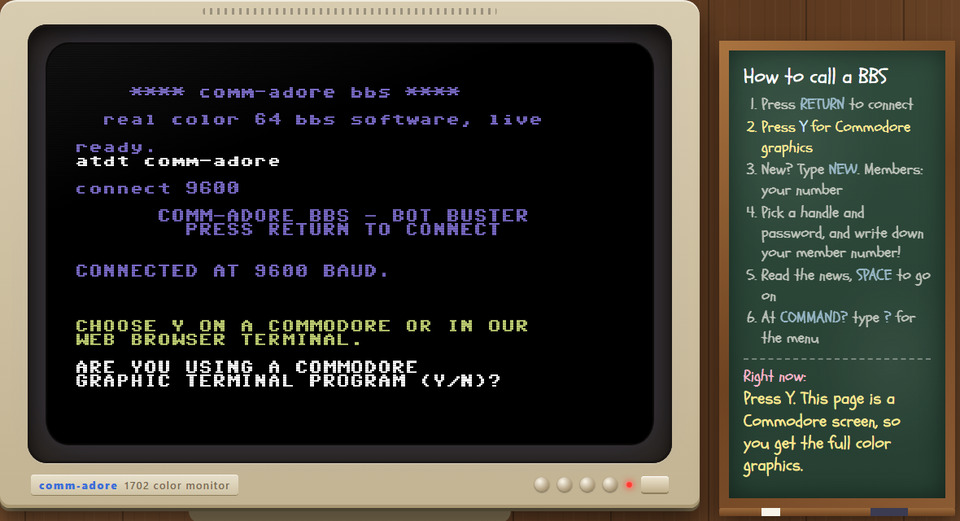
- Press RETURN (Enter) at the Bot Buster prompt. That's how the board knows you're a person and not a bot.
- Press Y when the board asks whether you're using a Commodore graphic terminal program. The page is one, so Y gets you the full-color board. (Press N and you get plain text. If that happens, just reload the page.)
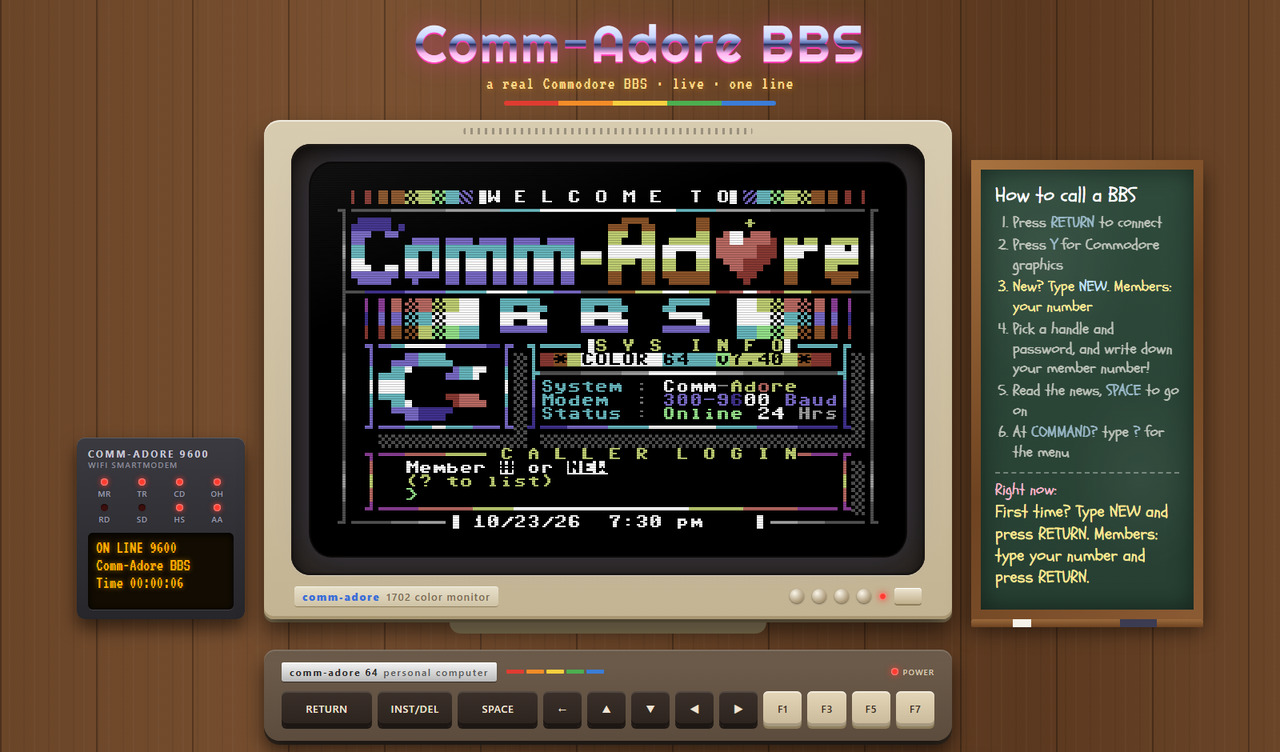
- Type NEW and press RETURN at the login screen. Members type their member number and their password instead.
- Pick a handle (the name you'll be known by on the board) and a password. The board gives you a member number. Write it down, with your password, because that's how you log on next time.
- Answer two quick questions: your first name and your zip code. The zip code gets you your own weather on the news page.
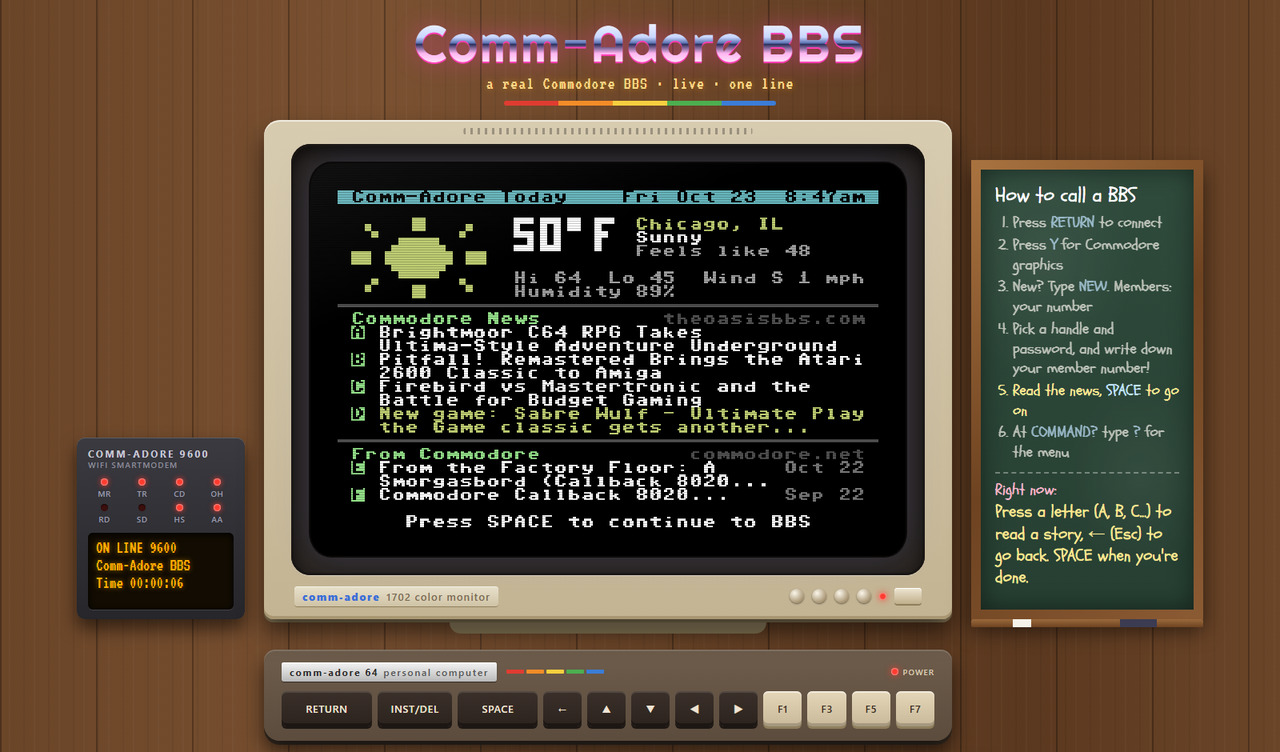
- Read the news. Every call opens with the day's weather and Commodore news. Press a letter to read a story right on the screen, ← (Esc) to come back, and SPACE when you're done.
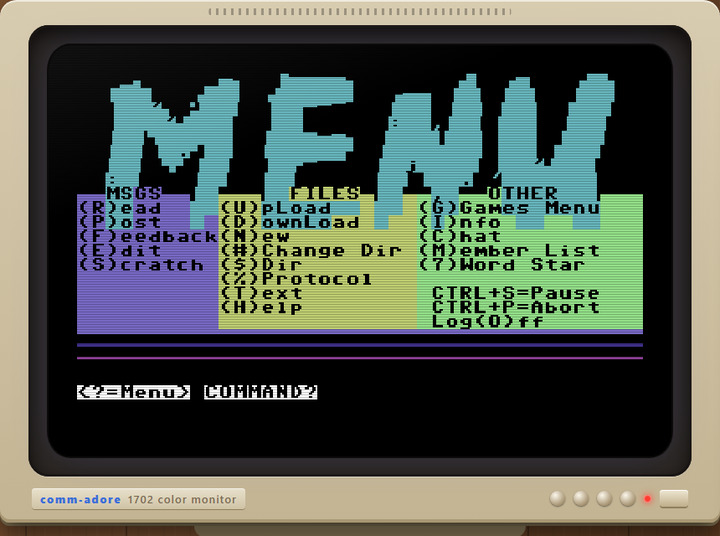
- At COMMAND?, press ? for the menu, then the letter of anything you'd like to try. G is the games room, with fifty-three games on four pages.
We added one line to the board itself for web callers: above the graphics question it now says, in yellow, to choose Y on a Commodore or in our web browser terminal.
Help wherever you are
Most people who tried a BBS back in the day remember the same thing: getting lost. Which key reads the next message? How do you finish a message you've typed? What does "(L)ist, (E)dit, (C)ontinue" want from you? So the chalkboard doesn't stop at the login. It follows you around the board.
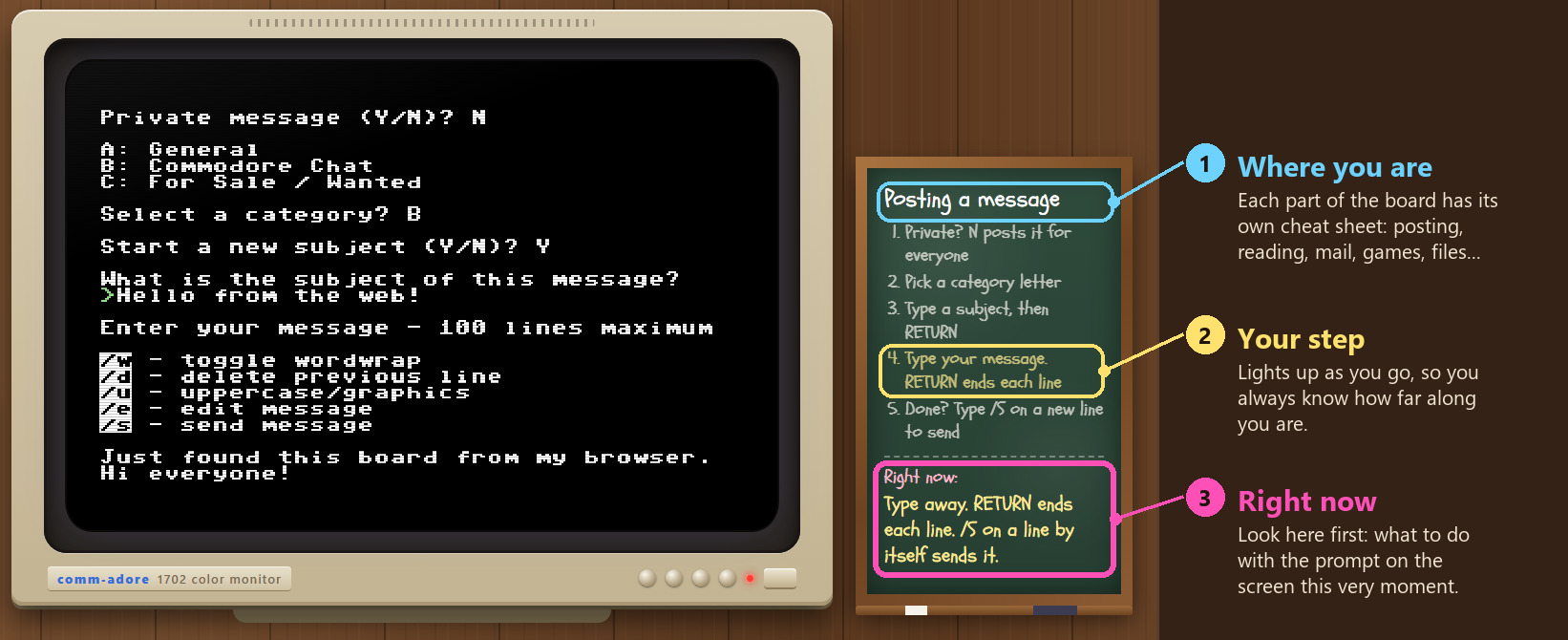
There are three things to look at on the chalkboard:
- Where you are. The title changes with each part of the board, and under it is a short cheat sheet of the keys that work there.
- Your step. For things done in steps, like logging on or posting a message, the step you're on lights up in yellow.
- Right now. The yellow line at the bottom is the one to look at when you're not sure. It explains the exact prompt on the screen at that moment, like "Type away. RETURN ends each line. /S on a line by itself sends it."
Here's what it covers:
| Where you are | What the chalkboard tells you |
|---|---|
| Logging on | The six steps, from the Bot Buster to your first COMMAND? prompt |
| The news | A letter reads a story, any key turns the page, ← goes back, SPACE moves on |
| The main menu | The keys worth knowing: R read, P post, F feedback, C chat, G games, M members, T text files, O log off. One key, no RETURN needed |
| Reading messages | Pick a category (or RETURN for all), then after each message: RETURN for the next, A to reply, R to read it again, N for nonstop, Q to quit |
| Posting a message | Step by step: private or public, the category, the subject, typing it, and /S on a new line to send it |
| The message editor | What each choice on the edit menu does (List, Edit, Continue, Delete, Insert, Send, Abort), and what each of its questions is asking |
| Feedback, mail and chat | Writing the sysop a private note, the mailbox keys (D delete, H hold, A reply, R reread), paging the sysop |
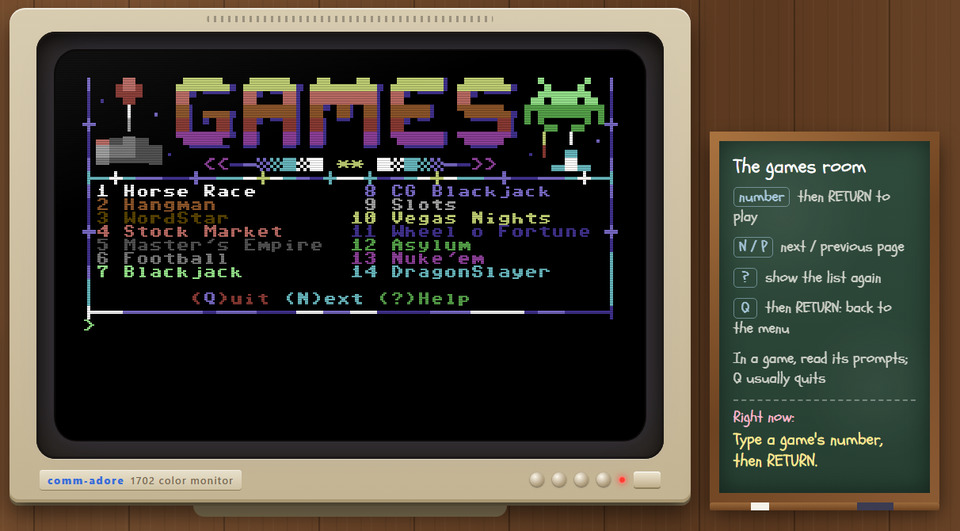
| The games room | A game's number and RETURN to play, N and P to turn the page, Q to leave |
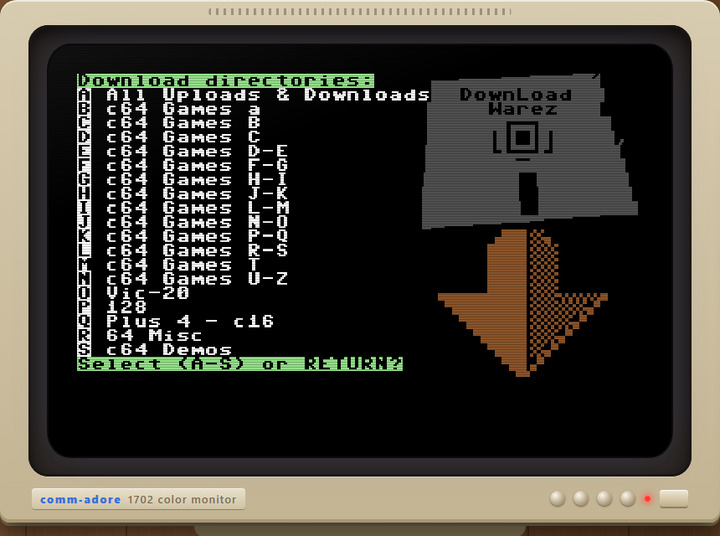
| File areas | You can look around, but the browser can't transfer files. If a transfer starts anyway, it tells you how to cancel it: Ctrl+X twice, or Ctrl+P for Punter |
| Member list, text files, logging off | What to type at each one, right down to "Thanks for calling!" |
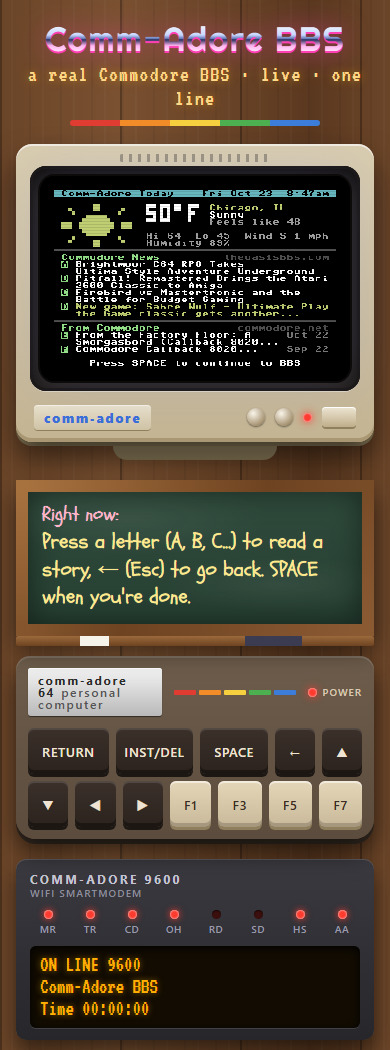
On a phone the chalkboard sits right under the screen and shows where you are and the Right now line. Tap it to open the full cheat sheet.
The keys
The board was made for a Commodore 64 keyboard, so a few keys need a word:
| On the 64 | In your browser |
|---|---|
| RETURN | Enter |
| INST/DEL | Backspace |
| ← (left arrow) | Esc or ` (backtick) |
| Cursor keys | Arrow keys |
| CLR/HOME | Shift+Home / Home |
| F1 to F8 | F1 to F8 |
| Colors | Ctrl+1 to Ctrl+8, Alt+1 to Alt+8 for the Commodore-key colors |
| RVS ON / OFF | Ctrl+9 / Ctrl+0 |
Under the monitor there's a 64-style keyboard with RETURN, DEL, SPACE, the arrow keys and the F-keys, so you can play without a keyboard at all. On a phone, tap the screen to bring up your keyboard.
One line, like the old days
The board has one line, just like a board in 1986. If someone else is on, you get a busy signal. Don't worry, you don't have to keep trying: the page waits and redials for you every two minutes and tells you on the modem's display what it's doing. Leave the tab open and you'll be in when the line frees up.
Is it really a Commodore BBS?
The software is. The board runs Color 64 7.40, our 9600-baud edition of the board program sysops ran in the 80s, with our own mods: the welcome screens that change with the season, the games room, the news page and more. It runs on a Commodore 64 with a SuperCPU, a CMD HD and a RAMLink, emulated in VICE. The screens you see are the board's own PETSCII screens, sent byte for byte. Your browser draws them with the 64's character set and VICE's colors, and the board can't tell you apart from a caller on a real 64 with a modem.
If you do have a 64 (or a 128) and a WiFi modem, call it the classic way: adorebbs.ddnsgeek.com port 6400, with CCGMS or any Commodore terminal program. You'll need a real terminal program for file transfers too (Punter and Xmodem), since the browser can't do those. On a PC, SyncTERM works great.
Under the hood (for the techy folks)
Here's what happens when you open the page.
The path of a call. The page opens a secure WebSocket to our web server. Our site's server turns each WebSocket into a telnet connection to the board, and from there it's the same path every caller takes: our modem bridge, a small Python program that answers like a Hayes modem, hands the call to the emulated C64's RS-232 port in VICE, and Color 64 answers the phone. The relay passes bytes through untouched, so the page itself speaks telnet: it answers the bridge's negotiation, asks for binary mode both ways and doubles any $FF byte, like any other telnet client.
The terminal. We wrote our own instead of using an existing web terminal, because we wanted the screen to behave like a 64, quirks and all. It's about 400 lines of JavaScript drawing a 320x200 screen on a canvas with the C64's character ROM, both character sets, and VICE's palette. The hard part is that a C64 BBS doesn't just print text. It moves the cursor, inserts and deletes characters, switches between upper and lower case sets, and leans on the 64's screen editor. Our terminal emulates that editor, including the parts most terminals skip:
- Logical lines. On a 64, when printing runs off the end of a row, the screen editor joins that row and the next into one 80-column logical line, and a RETURN on a joined row skips its partner. We learned that one the hard way this week: our new download screen fills the whole screen, so the 64 joined the rows in pairs and the directory list came out double-spaced on a real C64. We fixed the board (it now places each line with cursor moves) and taught the terminal the same rule. Fed the old version of that screen, the browser shows the same blank lines the real 64 did.
- INST/DEL and the 64's insert mode, where a control code typed after an insert shows as a reverse symbol instead of acting. Our full-screen pictures use INST to fill the bottom-right corner without scrolling, so this matters.
- Scrolling, reverse video, the color codes and the case switch, all as the KERNAL does them.
We checked it against our own PETSCII renderer, the one we use to preview every screen on the board. The news page, the welcome pictures and the download screen come out identical pixel for pixel.
Your address. Since every web call reaches the board from our web server, the board would see one address for everyone. That would break the Bot Buster, the bans for bots that hammer the line, and the weather, which goes by where you are. So the relay sends one line ahead of the call with the visitor's real address, in the PROXY protocol format that load balancers use for the same job. The bridge believes that line only when it comes from our own server. The relay allows one call per address at a time and refuses connections opened by other websites.
The chalkboard. The page reads what the board sends and looks for about eighty prompts it knows, every one copied from the board's own BASIC: the login in bbs.init, the reader, the message editor, mail and chat in bbs.msgs, the file areas in bbs.xfer, and the games menu. Each prompt belongs to an area (which picks the cheat sheet) and has its own hint. The latest prompt seen wins, and when two end at the same spot the longer, more exact one does. That rule caught two traps while we built it: the editor's own help ends with "/s - send message", which would have fired a "send it?" hint while you were still typing, and "(D)elete," appears both on the edit menu and in the mailbox. We tested it by playing a whole session through it, login to logoff, and checking the board's answer at every step. It reads only what the board already shows you, and nothing is sent anywhere else.
The modem. The lights do what a real modem's lights did. OH (off hook) comes on when the page dials, CD (carrier detect) while you're connected, and RD and SD flicker as data comes in and goes out. Once you're past the Bot Buster, the display shows your time on line.
The monitor. It's all CSS: a beige case and a dark bezel, scanlines and a soft curve over the screen, and a power-on flash when the page loads. There are no pictures of real hardware; it's all drawn by the browser.
Come on in
Open bbs.comm-adore.com, press RETURN, press Y and type NEW. Leave the sysop a message and tell us what you think. And if you know someone who ran a BBS back in the day, or always wondered what one was, send them the link.